

The VPS hosting market is projected to reach $8.3 billion by 2026, growing at a compound annual rate of 16.2%. This explosive growth reflects a broader shift: more people want control over their infrastructure, especially when hosting personal AI assistants like Clawdbot.
Clawdbot is an open-source, highly customizable personal AI assistant that supports multiple messaging channels (WhatsApp, Discord, Slack) and thrives on 24/7 connectivity, persistence of context, and the ability to run on your own machine or cloud
If you’ve decided to run Clawdbot, your next challenge is choosing where to host it. The right platform can mean the difference between a smooth, always-available assistant and constant frustration with downtime or performance issues.
This guide breaks down the nine best hosting platforms for Clawdbot, organized by what they do best. You’ll learn which platforms match your technical skills, budget, and requirements so you can make a confident choice.
Understanding Clawdbot’s Hosting Requirements
Before diving into specific platforms, you need to know what Clawdbot actually demands from a server.
At minimum, Clawdbot needs 2GB RAM and 2 CPU cores to handle basic chat functionality across messaging platforms like Telegram, WhatsApp, or Discord. This gets you a working assistant that can respond to messages and maintain conversation context.
However, if you want to use browser automation skills or run multiple intensive workflows simultaneously, you’ll want at least 4GB of RAM. Production environments handling complex tasks often require even more resources.
Storage needs are relatively modest. You’ll want at least 20GB for the application itself, conversation history, and workspace files. The Node.js runtime environment is essential since Clawdbot is built on it.
Network stability matters more than raw bandwidth. Clawdbot maintains persistent connections to messaging platforms, so you need consistent uptime rather than massive data transfer capabilities.
The Three Types of Hosting Platforms
Hosting platforms fall into three main categories, each with distinct trade-offs.
Traditional VPS providers give you a virtual server with root access. You install everything yourself, configure security, and manage updates. This approach offers maximum control and typically the best price-to-performance ratio. The downside? You’re responsible for everything, from initial setup to ongoing maintenance.
Modern PaaS (Platform as a Service) platforms abstract away infrastructure complexity. You connect your code repository, and the platform handles deployment, scaling, and infrastructure management. Setup is faster, but you pay a premium for convenience and surrender some control.
Hyperscalers like AWS and Google Cloud offer enterprise-grade infrastructure with unlimited scaling potential. They’re powerful but complex, with steep learning curves and pricing models that can catch you off guard.
Your choice depends on three factors: technical comfort level, budget flexibility, and maintenance time availability.
Top 9 Hosting Platforms for Clawdbot
Hetzner
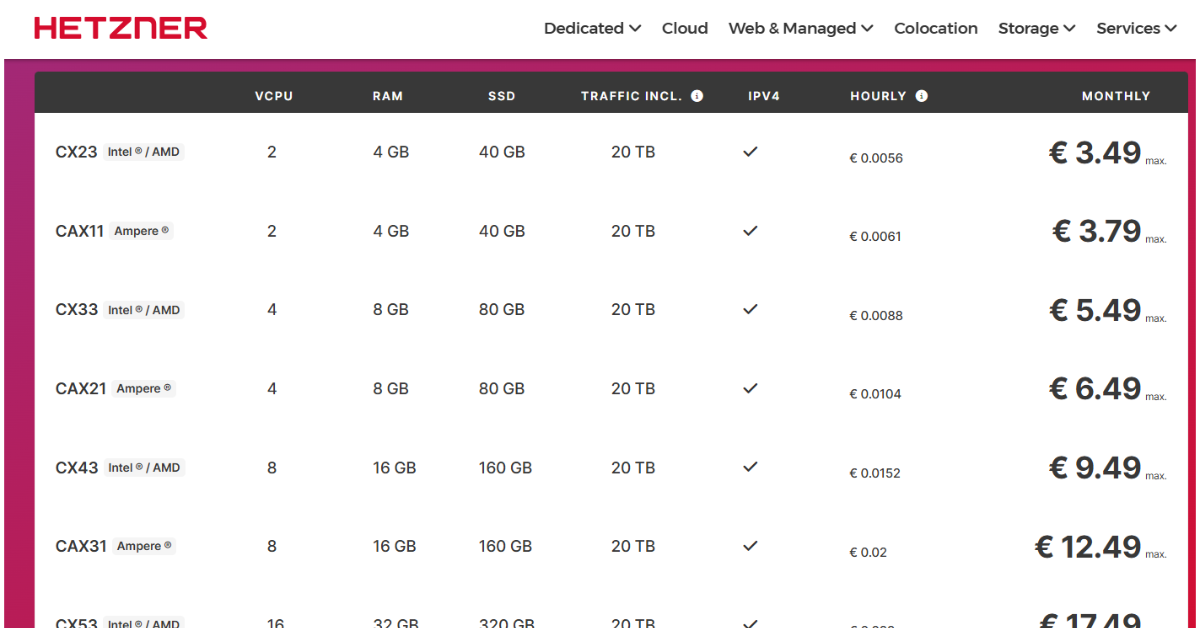
Hetzner delivers exceptional price-to-performance, especially if you’re based in Europe or targeting European users.
Starting at around €3.49 per month for instances with 4GB RAM and 2 vCPUs, Hetzner undercuts most competitors significantly. Their infrastructure is rock-solid, with data centers in Germany, Finland, the USA, and Singapore that deliver reliable performance.
Setup requires moderate technical knowledge since you’re working with a standard VPS, but the documentation is thorough.
The main limitation is geographic. If your users are primarily in North America or Asia, latency might be noticeable. Hetzner also requires more hands-on configuration than managed platforms.
DigitalOcean
DigitalOcean strikes an excellent balance between simplicity and control, making it popular among developers.
Their Droplets (virtual servers) start at $6 per month for 1GB RAM, though the $12/month tier with 2GB RAM is what you’ll actually want for Clawdbot. The interface is intuitive, with a clean dashboard that makes server management straightforward.
Pricing is transparent and predictable. You know exactly what you’ll pay each month without surprise bandwidth charges or hidden fees.
The trade-off is cost. DigitalOcean isn’t the cheapest option, but you’re paying for ease of use and excellent support resources.
Best for: Developers who want straightforward server management without sacrificing too much control.
Linode (Akamai)
Linode, now part of Akamai, has built a reputation for reliability and honest pricing over its long history in the VPS space.
Plans start at $5 per month for 1GB RAM instances, making Linode one of the more affordable options. Performance is consistent, and their customer support is notably helpful, which matters when you’re troubleshooting deployment issues at midnight.
The interface feels slightly less modern than DigitalOcean’s, but it’s perfectly functional. Linode’s documentation is solid, and the platform has been around long enough that you’ll find community solutions to most problems.
Linode works well for cost-conscious developers who value support quality and don’t need the flashiest interface.
Best for: Users who prioritize affordable pricing and helpful support over cutting-edge features.
Railway
Railway revolutionizes Clawdbot deployment with its one-click template specifically designed for the platform.
The setup process is remarkably simple. Connect your GitHub account, click deploy on the Clawdbot template, configure a few environment variables, and you’re running within minutes. Railway handles HTTPS certificates, provides built-in monitoring, and offers a visual interface for managing services.
Pricing is usage-based, typically running $5-20 per month for small to medium Clawdbot instances. This model means you pay for what you actually use rather than reserving resources.
The main consideration is cost at scale. As your usage grows, Railway’s convenience premium becomes more noticeable compared to traditional VPS options. You also have less granular control over the underlying infrastructure.
Managed VPS services are growing at 16.5% annually, outpacing unmanaged options. This trend reflects what Railway delivers: developers are willing to pay more to avoid infrastructure headaches.
Best for: Non-technical users or developers who want the absolute fastest deployment with minimal configuration.
Render
Render offers managed platform features with generous free tier options, making it attractive for testing Clawdbot before committing financially.
The free tier includes enough resources to run a basic Clawdbot instance, though you’ll likely want to upgrade to a paid plan ($7/month and up) for reliable performance. Render handles deployments automatically when you push to your Git repository, managing SSL certificates and providing managed PostgreSQL databases.
Setup complexity is low. Connect your repository, configure environment variables, and Render takes care of the rest. The platform is particularly good for developers already comfortable with Git-based workflows.
Build times can occasionally be slow compared to competitors, and you have fewer region options than larger providers. However, for straightforward deployments, Render delivers solid reliability without demanding deep infrastructure knowledge.
Best for: Developers who want managed simplicity and value a free tier for testing.
Fly.io
Fly.io takes a different approach by running your application on lightweight VMs distributed globally, bringing your Clawdbot close to users wherever they are.
This architecture shines for latency-sensitive applications. If you’re accessing Clawdbot from different continents or want consistently low response times worldwide, Fly.io’s edge deployment delivers measurable benefits.
Pricing starts around $2 per month but scales based on actual usage. The learning curve is steeper than Railway or Render since Fly.io gives you more control and expects more configuration knowledge.
One notable limitation is the lack of a fully managed database service. Fly.io recommends using external database providers, which adds complexity if you need persistent storage beyond basic conversation history.
Best for: Users who need global low-latency access and have moderate technical skills to handle configuration.
AWS EC2
Amazon Web Services EC2 represents the hyperscaler approach, offering virtually unlimited flexibility at the cost of significant complexity.
You can configure instances to exact specifications, integrate with dozens of other AWS services, and scale to handle millions of requests if needed. For Clawdbot, a comparable instance typically costs $10-30 per month, though AWS’s pricing model makes exact predictions difficult.
The learning curve is steep. AWS’s console overwhelms newcomers with options, and you’ll spend considerable time understanding security groups, IAM roles, and networking configurations.
However, if you’re running Clawdbot as part of a larger infrastructure already on AWS, or if you need advanced features like VPC networking, AWS provides unmatched capabilities.
Best for: Enterprise deployments or users who need extensive AWS service integrations.
Google Cloud Platform
Google Cloud Platform’s Compute Engine offers strong infrastructure with particular advantages for AI and machine learning workloads.
If you plan to extend Clawdbot with custom AI models or integrate with Google’s AI services, GCP provides seamless connections. The platform includes a generous free tier that lets you test deployments without financial commitment.
Pricing is comparable to AWS at around $15-35 per month for basic instances running Clawdbot. The console is complex but slightly more intuitive than AWS for newcomers.
Like AWS, GCP is overkill for simple Clawdbot deployments. You’re paying for capabilities you probably won’t use unless you have specific integration needs or are already invested in the Google ecosystem.
Best for: Users already working within Google’s ecosystem or planning AI-heavy customizations.
Vultr
Vultr delivers VPS hosting with an impressive number of data center locations worldwide at competitive prices.
Starting at $6 per month for 1GB RAM instances, Vultr’s pricing sits between budget providers like Hetzner and premium options like DigitalOcean. Their strength is geographic coverage with 25+ data center locations, letting you position your Clawdbot server close to your primary usage region.
The interface is straightforward, though community content and tutorials are less abundant than for DigitalOcean. Setup complexity is moderate, similar to other traditional VPS providers.
Vultr works well when you need specific geographic presence that other providers don’t offer, or when you want traditional VPS control at a reasonable price point.
Best for: Users needing specific geographic server locations at competitive prices.
Making Your Choice
Start by assessing your technical comfort level honestly. If terms like “SSH,” “firewall rules,” and “systemd services” feel foreign, lean toward PaaS platforms like Railway or Render. They’ll save you hours of frustration.
Budget constraints come next. If you’re price-sensitive and technically capable, Hetzner or Linode delivers the most resources per dollar. If convenience matters more than cost, Railway’s slightly higher price buys you significant time savings.
Consider your geographic needs. Hosting Clawdbot near your primary usage region reduces latency. Hetzner excels for Europe, DigitalOcean for North America, and Fly.io for truly global distribution.
Think about maintenance time. Traditional VPS platforms require ongoing updates, security patches, and monitoring. PaaS platforms handle this automatically, but cost more monthly.
Finally, start small. Most platforms offer low-cost entry tiers or free trials. Deploy Clawdbot on your chosen platform and test it for a week. You’ll quickly discover whether the setup process was manageable and if performance meets your needs.